Thursday, 31 January 2013

Update: )

 I have teamed up with a previous team that i worked with back in 2nd year animation. the director Jaime Buchanan has wanted to create a short animated sketch adapted from his comic design 'Stupid Kow' the sketch involves a farmer a cow and a box milk. if you want to find out more visit the group blog were you can find out what's going on and what the story is about. My job is to create body rigs fro both the kow and the farmer characters. the kow i have been informed doesn't have to move his legs as well just arms and head and general movement and the farmer has to be fully functional. 

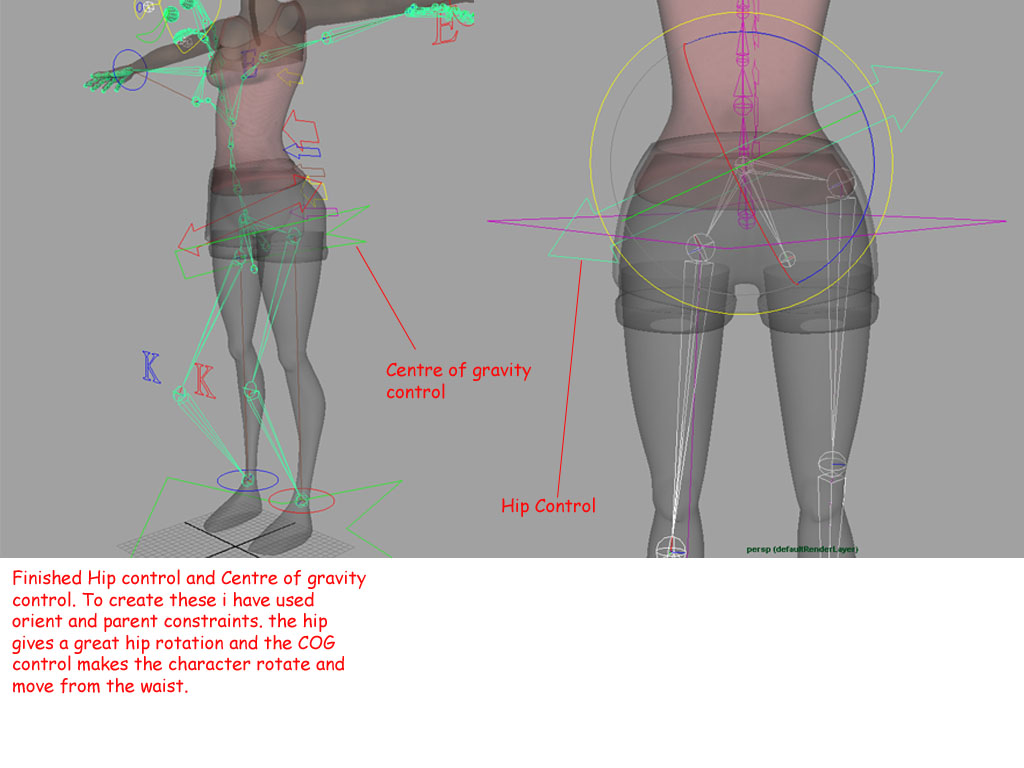
using my research from the Dee rig i was able to create a rig fairly quickly. but i soon came into problems with the model of the kow. the mesh on the model did not have the required edge loops.


as you can see the arm has a shoulder joint, a elbow and wrist joint. the green lines on the arm are what are called edge loops, as you can see there are 3 lines that surround the elbow  this is bad as there should be 5 or so to make life easier when paint weighting the character. the more edge loops the more influence you can give from the elbow joints. 

Instead of sending the model back to the modeller i have added them in myself and this is the rig so far.


Here are some reference videos that i have been using to help me in my animation ideas 


Tuesday, 1 January 2013

Update : )

 I have now rigged the character. the character was rigged without a foot rig because it was not need so to save time i left it out, the rig is fairly basic but i have not bound it to the skin yet so we'll see if i come in to any problems. i have also set up the controls and relevant connections 


Here are some rough set-up descriptions that show my progress best.

Sunday, 23 December 2012

Update : )

 I have now constructed the skeleton and sorted out the orientation of the joints. i have also put Controls in place to control certain parts of the body(arms, head etc)


Monday, 12 November 2012

Update : )

 i have began to study the skeleton of a human so i know were to place my joints.


Using this skeleton reference material and the study notes made from the book 'character rigging' also with the digital tutors tutorials i pretty confident on how to construct the skeleton.

Sunday, 4 November 2012

Update : )


 Here are some videos i have been watching and studying to help me with my own work.

 Digital Tutors: Introduction to Character Rigging in Maya,  Understanding joints in Maya, Creating a tool that generates a box curve Introduction to NURBS NURBS modeling tools The benefits of IK / FK blending in Maya Youtube: How to Paint Skin Weights in Maya 2011. Maya hand modeling tutorial #6 - Rigging with contraint controls. (Part 1) Create your skeleton with Maya bone tool, joints and mirror. (Part 2) Joint Orientation and Reverse foot skeleton. (Part 3) Rig Maya legs with an IK handle reverse foot and foot roll. (Part 4) Create hip and spine rigging for your Maya character. (Part 5) Add a head control, shoulder and arm riggs to your Maya character. (part 6) Final tutorial Maya rigging, hand and eye controls.  These are just a selection of videos that have helped me with understanding rigging in maya and modelling.


Thursday, 1 November 2012

Update : )


 I am now studying character rigging as it is one of my two specialism for the year along with 3D animation. the first character i will rig is 'DEE' she is one of the characters from the Krokodi film. i have been using books, Digital Tutors, and asking questions to friends in the animation industry for some pointers.  I read this book "learning maya - (character rigging and animation) and used it to help me understand so many aspects of the rigging stage. Along with the 'digital tutors' website i have been reading myself until i receive the model from laura mcnaughton who is modelling the character.